<style>
.main{
}
.main img{
border-radius:10px;
}
.main h1{
text-align: center;
border: none;
color:4B4B4B;
letter-spacing: 3px;
}
.main h6{
text-align:right;
color:#F4AA14;
font-size:18px;
}
.main code{
background-color:#FFF0D1;
padding: 8px 10px;
border-radius: 20px;
margin-right:7px;
}
.main h2{
background-color:#0B8D97;
color:#fff;
width: max-content;
padding: 7px 25px 7px 17px;
border-top-right-radius: 40px;
border-bottom-right-radius: 40px;
border-bottom: none;
margin-top:46px;
margin-bottom: 25px;
}
.main h2 img{
padding-bottom: 4px;
border-radius:0;
}
.main p,li{
font-size: 18px;
line-height: 29px;
letter-spacing: 0.15em;
color:#525252;
}
.main .result{
background-color:#0B8D97;
padding:0.8rem 1rem 1rem 1rem;
border-radius: 10px;
}
.main .result h3{
text-align:center;
color:#fff;
margin-bottom:3rem;
}
.main .result h3 img{
margin-bottom:0.5rem
}
.main .result .pic img{
border: 5px solid #FFFFFF;
}
.main .pic{
text-align:center;
width: 84%;
margin: auto;
margin-top: 2rem;
}
.pic p{
color:#fff;
text-align:left;
font-size:1.8rem;
line-height:4rem
}
</style>
<div class="main">

# 六個小時,快樂學會物聯網!
###### `初階` 6 小時
##  課程目的
想感受時下「最潮」的物聯網開發體驗嗎?
想瞭解「創客」或「自造者」究竟在夯些什麼嗎?
想極速學會「軟 ( Web ) 硬 ( Arduino ) 兼施」的跨領域看家本領嗎?
現在,讓你「從軟體跨足硬體,從硬體飛上雲端」的課程來了!
6 個小時, 6 種主題、7 個傳感器運用、4 個經典案例!
##  課程目標
1.【 會飛的 Arduino 】簡單幾個步驟,讓 Arduino 長出雲端的翅膀
2.【 全彩 LED 】玩轉五顏六色的光影變化
3.【 蜂鳴器 】創作屬於自己的音樂故事
4.【 溫濕度傳感器 】讓視覺化圖表的呈現周遭生活的點點滴滴
5.【 點矩陣顯示器 】用跑馬燈寫出人生的喜怒哀樂
6.【 RFID 】一卡在手,樂趣無窮
7.【 紅外線發射與接收 】智慧家電的未來,盡在你我手中
##  課程內容
* 起手式 ( 需自備 Arduino UNO + Webduino Fly )
* 認識 Webduino 與 Arduino
* 基礎電子電路學
* 基礎燒錄 Arduino 韌體
* 基礎
* LED、全彩 LED
* 蜂鳴器
* 溫濕度傳感器
* 進階
* LED 點矩陣顯示器
* RFID
* 紅外線發射與接收
* 範例實戰
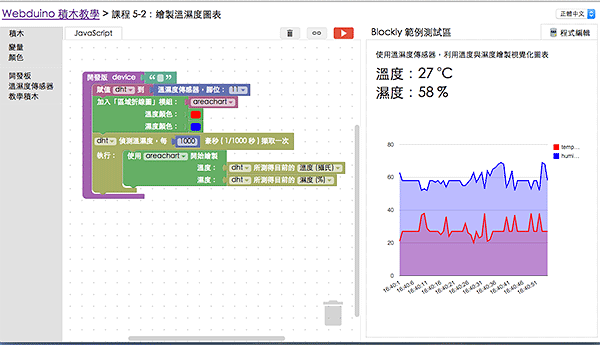
* 製作視覺化圖表顯示溫濕度
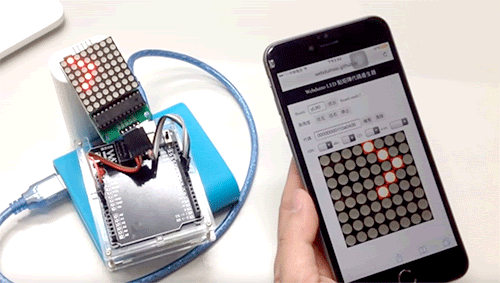
* 使用手機繪製圖案,即時用點矩陣顯示器顯示
* RFID 串接雲端資料庫
* Google 試算表控制 Arduino
##  課前準備
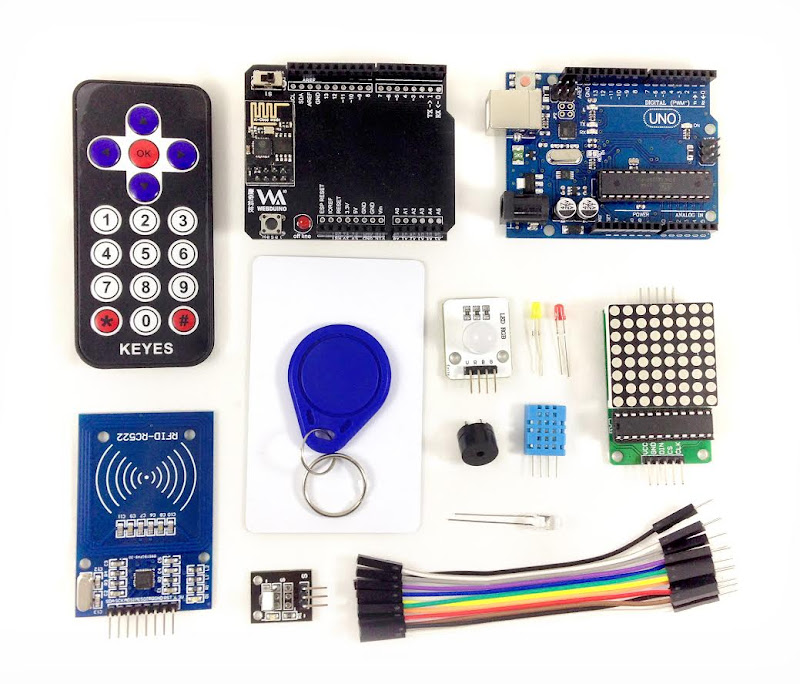
杜邦線 x12、LED x2、全彩 LED x1、蜂鳴器 x1、溫濕度傳感器 x1、RFID x1、RFID 磁卡 x1、磁扣 x1、點矩陣 x1、紅外線發射器 x1、紅外線接收器 x1、紅外線遙控器 x1
<div class="result">
###  成果展示
<div class="pic">
</div>
<div class="pic">
</div>
</div>