<style>
.main{
}
.main img{
border-radius:10px;
}
.main h1{
text-align: center;
border: none;
color:4B4B4B;
letter-spacing: 3px;
}
.main h6{
text-align:right;
color:#F4AA14;
font-size:18px;
}
.main code{
background-color:#FFF0D1;
padding: 8px 10px;
border-radius: 20px;
margin-right:7px;
}
.main h2{
background-color:#0B8D97;
color:#fff;
width: max-content;
padding: 7px 25px 7px 17px;
border-top-right-radius: 40px;
border-bottom-right-radius: 40px;
border-bottom: none;
margin-top:46px;
margin-bottom: 25px;
}
.main h2 img{
padding-bottom: 4px;
border-radius:0;
}
.main p,li{
font-size: 18px;
line-height: 29px;
letter-spacing: 0.15em;
color:#525252;
}
.main .result{
background-color:#0B8D97;
padding:0.8rem 1rem 1rem 1rem;
border-radius: 10px;
}
.main .result h3{
text-align:center;
color:#fff;
margin-bottom:3rem;
}
.main .result h3 img{
margin-bottom:0.5rem
}
.main .result .pic img{
border: 5px solid #FFFFFF;
}
.main .pic{
text-align:center;
width: 84%;
margin: auto;
margin-top: 2rem;
}
.pic p{
color:#fff;
text-align:left;
font-size:1.8rem;
line-height:4rem
}
</style>
<div class="main">

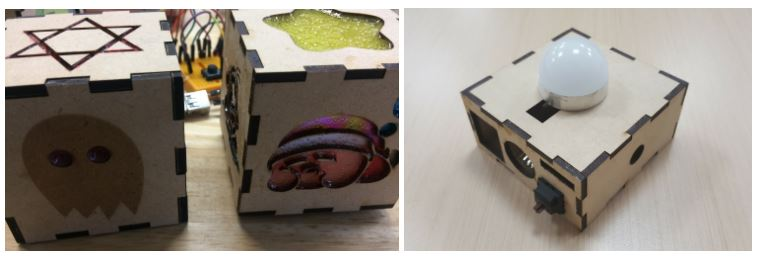
# 雷切智慧小夜燈
###### `進階` 6 小時
##  課程目標
我們將帶領學員於這門課中學到下列知識技術
1. 雷切技術入門
2. 電腦輔助設計入門
3. Webduino 入門
4. 雲端資料儲存
5. 雲端控制應用
##  課程內容
- 雷射切割簡介
- 機器操作教學
- 安全注意事項
- 雷切製圖設計—初階建模教學
- 開源繪圖軟體教學
- 客製化燈罩
- 小夜燈組裝與機構功能介紹
- Webduino 基本介紹
- 特色強調
- Webduino Smart介紹
- 範例及影片介紹
- Webduino 基本介紹(續)
- 雲端註冊、管理、燒錄韌體、監控裝置狀態
- Webduino Cloud平台程式設計入門
- 智慧檯燈
- 基本電子學
- 安全注意事項
- 接線原則
- 麵包板介紹
- 基本元件控制 (按鈕)
- 按按鈕就改變圖片大小
- 基本元件控制 (繼電器)
- 原理介紹
- 接線實作
- 綜合應用
- 打造智慧檯燈
- 雲端服務
- 將開關燈時間儲存於Google試算表做大數據
- 雲端開關燈APP
##  課前準備
1. Webduino Dr.Smart 套件
2. 雷切材料
3. 使用過 Chrome 瀏覽器與 Google G Suite 服務
4. 需自備 NB 和手機行動載具
<div class="result">
###  成果展示
<div class="pic">
</div>
</div>