<style>
.main{
}
.main img{
border-radius:10px;
}
.main h1{
text-align: center;
border: none;
color:4B4B4B;
letter-spacing: 3px;
}
.main h6{
text-align:right;
color:#F4AA14;
font-size:18px;
}
.main code{
background-color:#FFF0D1;
padding: 8px 10px;
border-radius: 20px;
margin-right:7px;
}
.main h2{
background-color:#0B8D97;
color:#fff;
width: max-content;
padding: 7px 25px 7px 17px;
border-top-right-radius: 40px;
border-bottom-right-radius: 40px;
border-bottom: none;
margin-top:46px;
margin-bottom: 25px;
}
.main h2 img{
padding-bottom: 4px;
border-radius:0;
}
.main p,li{
font-size: 18px;
line-height: 29px;
letter-spacing: 0.15em;
color:#525252;
}
.main .result{
background-color:#0B8D97;
padding:0.8rem 1rem 1rem 1rem;
border-radius: 10px;
}
.main .result h3{
text-align:center;
color:#fff;
margin-bottom:3rem;
}
.main .result h3 img{
margin-bottom:0.5rem
}
.main .result .pic img{
border: 5px solid #FFFFFF;
}
.main .pic{
text-align:center;
width: 84%;
margin: auto;
margin-top: 2rem;
}
.pic p{
color:#fff;
text-align:left;
font-size:1.8rem;
line-height:4rem
}
</style>
<div class="main">
# IoT 應用 - 雲端宅智慧
###### `初階` 3 小時
##  課程目的
智慧家庭的話題熱度未減,持續在改變我們的世界。將各種家庭設備,透過網路與彼此之間做連結,來提高整體的服務品質,以確保居家安全、居住環境健康及生活便利,並提供舒適的生活品質,創造人性化的居住環境。
關懷,從點亮一盞 LED 燈開始,運用 Webduino blockly 網頁拖拉程式積木,讓夜裏一盞柔和的燈,在你回家時自動打開,暈開一天的疲憊,
最後結合偵測環境溫濕度,學會搭建房屋模型,透過 Webduino 網頁程式編輯器,訓練程式編輯邏輯,輕鬆入門物聯網應用。
我們創造未來的同時,讓 Webduino告訴你,不論身在何處,家的關懷如影隨形。
##  課程內容
- 認識物聯網
- 學會基本程式邏輯概念
- 瞭解物聯網 ( IoT ) 基礎概念
- 房屋模型機構
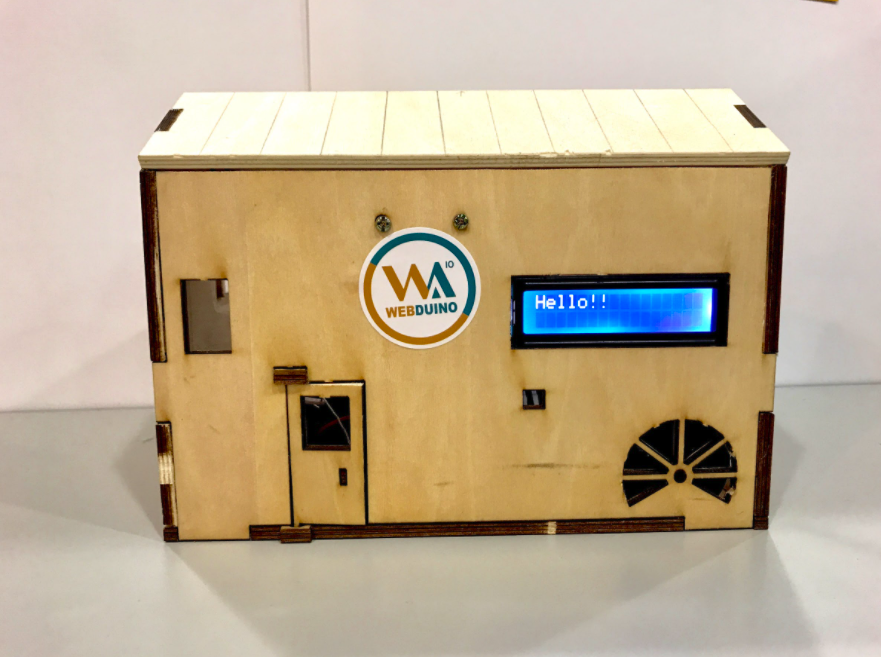
- 從無到有組裝 smart 智慧小屋
- 跨平台裝置監測與操控
- 遠端操控開關門
- 智慧控制
- Smart 智慧小屋程式編寫
- Smart 智慧小屋偵測溫度、警報器
- Smart 智慧小屋遠端控制開關燈
- LCD 液晶螢幕顯示溫濕度,顯示歡迎詞等
##  課前準備
1. 筆電(安裝 Chrome 瀏覽器)
2. 電力滿滿的行動電源(有的話更佳)
3. 智慧型手機(有的話更佳)
<div class="result">
###  成果展示
<div class="pic">
</div>
</div>