<style>
.main{
}
.main img{
border-radius:10px;
}
.main h1{
text-align: center;
border: none;
color:4B4B4B;
letter-spacing: 3px;
}
.main h6{
text-align:right;
color:#F4AA14;
font-size:18px;
}
.main code{
background-color:#FFF0D1;
padding: 8px 10px;
border-radius: 20px;
margin-right:7px;
}
.main h2{
background-color:#0B8D97;
color:#fff;
width: max-content;
padding: 7px 25px 7px 17px;
border-top-right-radius: 40px;
border-bottom-right-radius: 40px;
border-bottom: none;
margin-top:46px;
margin-bottom: 25px;
}
.main h2 img{
padding-bottom: 4px;
border-radius:0;
}
.main p,li{
font-size: 18px;
line-height: 29px;
letter-spacing: 0.15em;
color:#525252;
}
.main .result{
background-color:#0B8D97;
padding:0.8rem 1rem 1rem 1rem;
border-radius: 10px;
}
.main .result h3{
text-align:center;
color:#fff;
margin-bottom:3rem;
}
.main .result h3 img{
margin-bottom:0.5rem
}
.main .result .pic img{
border: 5px solid #FFFFFF;
}
.main .pic{
text-align:center;
width: 84%;
margin: auto;
margin-top: 2rem;
}
.pic p{
color:#fff;
text-align:left;
font-size:1.8rem;
line-height:4rem
}
</style>
<div class="main">

# IoT 應用 - 3hr 自製很潮又會唱歌的燈籠
###### `初階` 3 小時
##  課程目的
還擔心自己不會寫程式嗎?
元宵節即將到來~想讓你的燈籠更有特色、更加聰明嗎?使用 Webduino 就對啦!本次活動將帶你動手做一個小型燈籠,並帶你學習用簡單的程式控制它,除了用網頁、按鈕、手機、平板,還可以用「聲控」開燈,是不是很潮呢?快來實作出專屬於你的造型燈籠吧!Let’s GO
##  課程目標
1. 學會基本程式邏輯概念
2. 瞭解物聯網 ( IoT ) 基礎概念
3. N 種控制 LED 燈的方法(手機、聲控、光感、人臉辨識⋯⋯)
4. 自製七彩霓虹燈效果
5. 用蜂鳴器譜出美妙的樂章
6. 網頁彈鋼琴,還能與隔壁友人雙人合奏
7. 跨平台裝置數據監測與操控
8. 程式編織猜燈謎遊戲
##  課程內容
1. 大家來猜拳
2. 看誰最會按
3. 我是魔術師
4. 怪獸賽跑得第一
5. 電子骰子洗芭樂
6. 扭腰擺臀一起來
7. 我是音樂大師
8. 我是小小主播
9. 誰能告訴我現在溫度及空氣品質
10. 猜數字遊戲一把罩
##  課前準備
1. 電腦 ( 安裝 Chrome 瀏覽器 )
2. 行動電源
3. 智慧型手機
<div class="result">
###  成果展示
<div class="pic">
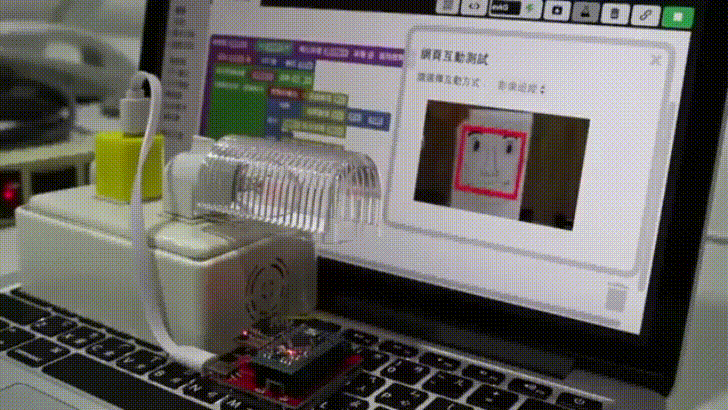
▲ 偵測到人臉就開燈
</div>
<div class="pic">
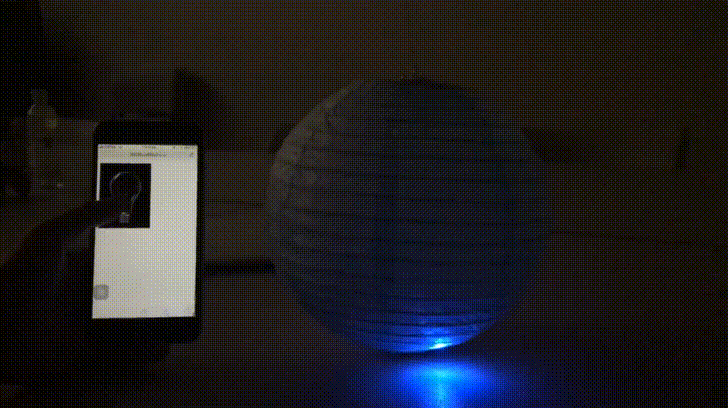
▲ 手機遙控智慧燈籠
</div>
</div>