<style>
.main{
}
.main img{
border-radius:10px;
}
.main h1{
text-align: center;
border: none;
color:4B4B4B;
letter-spacing: 3px;
}
.main h6{
text-align:right;
color:#F4AA14;
font-size:18px;
}
.main code{
background-color:#FFF0D1;
padding: 8px 10px;
border-radius: 20px;
margin-right:7px;
}
.main h2{
background-color:#0B8D97;
color:#fff;
width: max-content;
padding: 7px 25px 7px 17px;
border-top-right-radius: 40px;
border-bottom-right-radius: 40px;
border-bottom: none;
margin-top:46px;
margin-bottom: 25px;
}
.main h2 img{
padding-bottom: 4px;
border-radius:0;
}
.main p,li{
font-size: 18px;
line-height: 29px;
letter-spacing: 0.15em;
color:#525252;
}
.main .result{
background-color:#0B8D97;
padding:0.8rem 1rem 1rem 1rem;
border-radius: 10px;
}
.main .result h3{
text-align:center;
color:#fff;
margin-bottom:3rem;
}
.main .result h3 img{
margin-bottom:0.5rem
}
.main .result .pic img{
border: 5px solid #FFFFFF;
}
.main .pic{
text-align:center;
width: 84%;
margin: auto;
margin-top: 2rem;
}
.pic p{
color:#fff;
text-align:left;
font-size:1.8rem;
line-height:4rem
}
</style>
<div class="main">

# 超級機器人大亂鬥 ( Arduino 行動創意工作坊 )
###### `初階` 3 小時
##  課程目的
驀然回首,是否曾有個機器人讓您怦然心動?
是那個用生命陪伴我們成長的無敵鐵金剛?
還是聰明逗趣的哆啦 A 夢?亦或是白白胖胖的杯麵呢?
今天,我們將讓您打造專屬自己的機器人!
今天,我們將讓您感受操控機器人的浪漫!
今天,我們將讓您實現從小到大的機器人夢想!
跟著我們,享受創造機器人的樂趣!一起稱霸榮耀的鋼鐵擂台吧!
##  課程目標
- 機器人的組合 ( 了解機構原理、體驗動手樂趣 )
- 機器人的靈魂 ( 電子電路基本原理、基礎 Arduino、Webduino Blockly )
- 機器人的操控 ( Wi-Fi 無線控制、行動裝置操控 )
- 機器人的榮耀 ( 和其他的機器人進行比賽 )
##  課程內容
1. 機器人組裝。
2. Webduino 原理簡介。
3. 使用 Webduino Blockly 控制機器人。
4. 使用行動裝置操控機器人。
5. 機器人擂台賽。
##  課前準備
- Webduino 馬克 1 號 x1 ( 鐵粉票種不包含 )
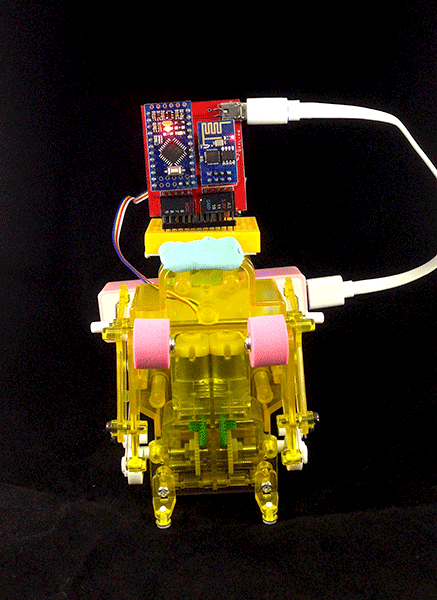
- 田宮拳擊機器人 x1
- 170 孔麵包板 x1
- 馬達驅動版 x1
- 行動電源 2600mA x1
- USB 電源線 x1
- 杜邦線數條
- 黏土數小塊
<div class="result">
###  成果展示
<div class="pic">
</div>
</div>